

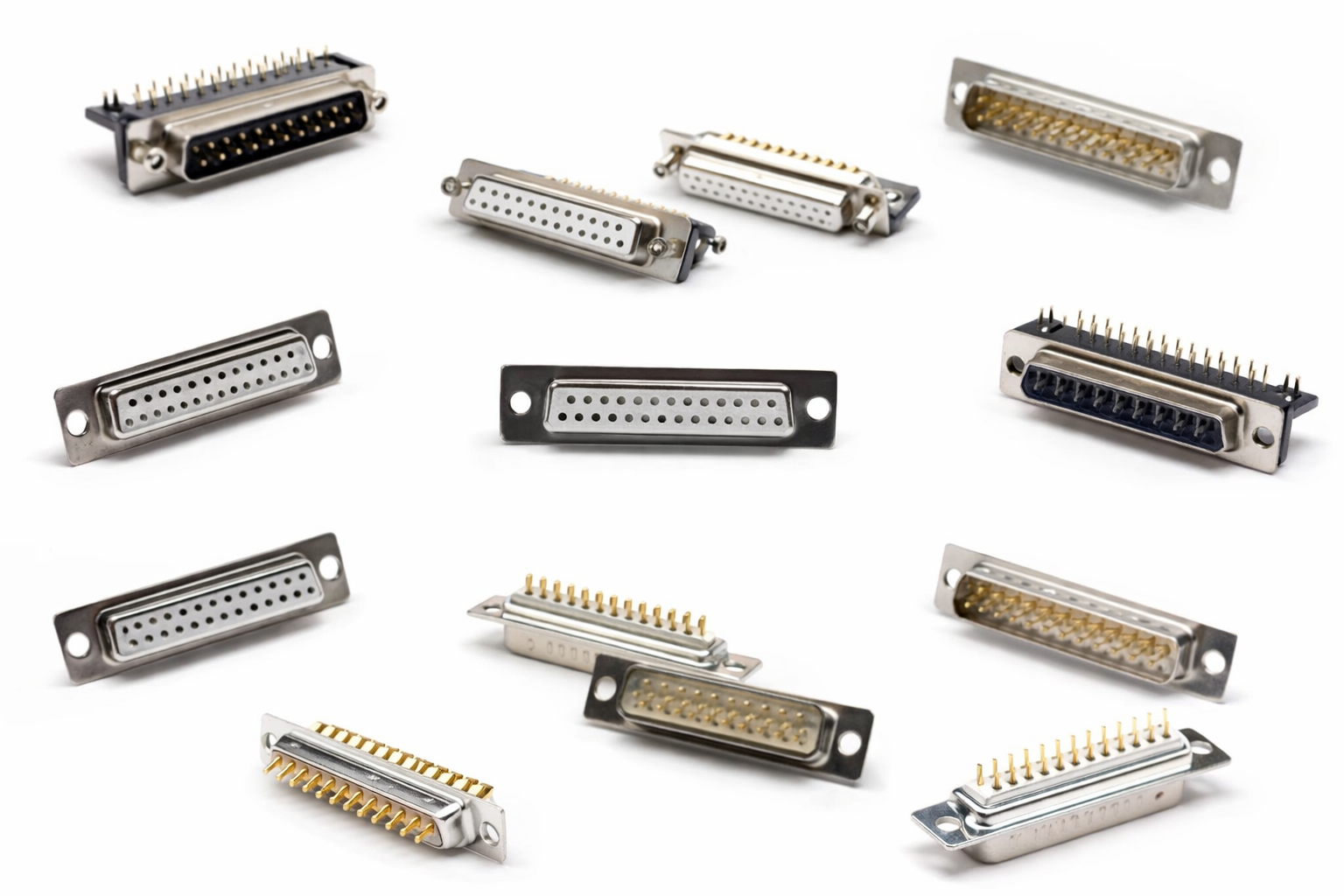
De DB25-connector is een van de meest herkenbare oudere connectoren in de geschiedenis van de elektronica. Gekenmerkt door zijn grote D-vormige metalen omhulsel en twee rijen contacten, de DB25 was ooit alomtegenwoordig op computers, industriële apparatuur, en communicatiesystemen. Terwijl moderne consumentenelektronica grotendeels is overgestapt op USB, Ethernet, en glasvezelgebaseerde interfaces, de DB25-connector blijft actief gebruikt in gespecialiseerde vakgebieden.
Dit artikel biedt een uitgebreide technische diepgaande duik in de DB25-connector. We zullen de structuur ervan onderzoeken, naamgevingsconventie, toepassingen, pinout-standaarden, mechanische en elektrische specificaties, soorten connectoren, materialen, fabrikanten, voordelen, beperkingen, en overwegingen bij het oplossen van problemen. Aan het einde van deze handleiding, U zult volledig begrijpen waarom de DB25-connector decennia na de introductie nog steeds relevant is.
Wat is een DB25-connector?

Een DB25-connector is een type D-subminiatuur (D-Sub) aansluiting met een B-formaat schaal En 25 elektrische contacten geregeld in twee verspringende rijen. De connector is ontworpen voor betrouwbare multi-signaaloverdracht en mechanische duurzaamheid.
De naam “DB25” decoderen
De naam DB25 geeft belangrijke fysieke kenmerken weer:
D – Verwijst naar de D-vormige metalen schaal, wat een onjuiste oriëntatie tijdens het paren voorkomt.
B – Geeft de schaalgrootte aan (B-maat), die de fysieke afmetingen bepaalt.
25 – Specificeert het totale aantal contacten (pinnen of stopcontacten).
Kernontwerpkenmerken
D-vormige metalen schaal voor polarisatie en elektromagnetische afscherming
Contactindeling met twee rijen op een 2.77 mm steek
Vijzels of schuifsloten voor een veilige paring
Aarding van metalen omhulsel voor EMI- en ESD-bescherming
Deze kenmerken maken DB25-connectoren bijzonder geschikt voor omgevingen waar mechanische stabiliteit en signaalintegriteit van cruciaal belang zijn.
Belangrijkste kenmerken en ontwerpkenmerken
De DB25-connector is ontworpen met het oog op betrouwbaarheid in plaats van op compactheid of ultrahoge datasnelheden.
Belangrijke kenmerken zijn onder meer:
Hoog aantal contacten in één enkele connector
Robuuste mechanische bevestiging met behulp van schroeven
Uitstekende weerstand tegen trillingen en onbedoelde ontkoppeling
Ondersteuning voor zowel digitale als analoge signalen
Flexibele pinbezetting afhankelijk van de toepassing
In tegenstelling tot moderne gestandaardiseerde interfaces, DB25-connectoren zijn dat wel interface-agnostisch, wat betekent dat hun elektrische functie volledig afhangt van de gebruikte pin-out.
Algemene toepassingen van DB25-connectoren
Parallelle poort (IEEE 1284)
De meest iconische toepassing van de DB25-connector is de parallelle printerpoort op vroege personal computers.
Gestandaardiseerd onder IEEE 1284
Overdrachten 8 stukjes data tegelijkertijd
Wordt voornamelijk gebruikt voor printers en scanners
Biedt een hogere doorvoer dan vroege seriële poorten
Hoewel verouderd op consumenten-pc's, parallelle DB25-poorten zijn nog steeds te vinden in oudere industriële apparatuur.
Seriële communicatie (RS-232)
Voordat de DB9-connector dominant werd, DB25 was de originele RS-232 seriële connector.
Belangrijkste kenmerken:
Asynchroon, bit-voor-bit gegevensoverdracht
Meerdere controle- en handdruklijnen
Ondersteunt DTE (Dataterminalapparatuur) en DCE (Datacommunicatieapparatuur) rollen
Veel industriële controllers, modems, en telecomsystemen gebruiken nog steeds DB25-connectoren om de volledige RS-232-signaalset.
Professionele audiotoepassingen
In moderne professionele audiosystemen, DB25-connectoren worden veel gebruikt vanwege hun kanaalmogelijkheden met hoge dichtheid.
Typische toepassingen zijn onder meer:
8-kanaal gebalanceerde analoge audio
Meerkanaals AES/EBU digitale audio
Verbindingen tussen audio-interfaces, mixers, patch baaien, en omvormers
De TASCAM pin-out is de de facto industriestandaard geworden, drastisch verminderen van de hoeveelheid kabel in vergelijking met individuele XLR-verbindingen.
De DB25-pinout begrijpen

A pin-out definieert de elektrische functie van elk contact. In tegenstelling tot USB of HDMI, de DB25-connector heeft geen universele pin-out.
Pinnummeringschema
Pinnen zijn opeenvolgend genummerd
De nummering begint linksboven als u de paringszijde bekijkt
Twee verspringende rijen zorgen voor een goede uitlijning
Het begrijpen van de juiste nummeringsoriëntatie is van cruciaal belang om bedradingsfouten te voorkomen.
Pinout parallelle poort (IEEE 1284)
De pin-out van de parallelle poort omvat:
8 datalijnen (D0–D7)
Controlesignalen (STROBOSCH, AUTOMATISCHE INVOER, INIT)
Statussignalen (DRUK BEZIG, ACK, FOUT)
Meerdere grondreferenties
Deze configuratie maakt gesynchroniseerde parallelle gegevensoverdracht mogelijk.
Pin-out seriële poort (RS-232)
De RS-232 DB25-pinout bevat:
Gegevens verzenden (TD)
Gegevens ontvangen (RD)
Verzoek om te verzenden (RTS)
Duidelijk om te verzenden (CTS)
Dataterminal gereed (DTR)
Dataset gereed (DSR)
Signaalaarde
Niet alle pinnen worden in elke implementatie gebruikt, maar de DB25 biedt volledige signaalbeschikbaarheid.
TASCAM analoge audio-pinout
De TASCAM-standaard wijst toe:
8 gebalanceerde audiokanalen
Elk kanaal gebruikt drie pinnen:
Heet (+)
Koud (−)
Grond
Gebalanceerde signalering verbetert de ruisonderdrukking en is essentieel in studio-omgevingen.
Fysieke afmetingen en vormfactor
Shell-maat: B
Gestandaardiseerde afmetingen gedefinieerd door D-Sub-specificaties
Compatibel tussen fabrikanten
Ondersteunt paneelmontage, kabelmontage, en PCB-gemonteerde ontwerpen
Dimensionale standaardisatie zorgt voor interoperabiliteit tussen leveranciers.
Belangrijkste technische specificaties
Typische DB25-connectorspecificaties:
Contacten: 25
Rijen: 2
Toonhoogte: 2.77 mm
Spanningswaarde: tot 250 V AC/DC
Huidige beoordeling: tot 5 A
Contactweerstand: < 20 mΩ
Isolatieweerstand: > 1000 MΩ
Bedrijfstemperatuur: −55 °C tot +125 °C
De werkelijke beoordelingen variëren per fabrikant en contactplating.
Soorten DB25-connectoren
Op geslacht
Mannelijk (plug): Blootgestelde pinnen, meestal op kabels
Vrouwelijk (houder): Stopcontacten, meestal op een paneel gemonteerd
Door montagestijl
Kabelmontage: Gebruikt voor aangepaste kabels
PCB-montage: Direct solderen op printplaten
Paneelmontage: Vaste externe interfaces
Op beëindigingsstijl
Soldeer beker: Hoge betrouwbaarheid, handmatige montage
IDC: Snelle afsluiting voor lintkabels
Krimpen: Gasdichte verbindingen, bruikbare contacten
Elke beëindigingsmethode heeft een wisselwerking tussen betrouwbaarheid, kosten, en montagesnelheid.
Structuur en materialen
Schelp: Staal of zinklegering, vaak vernikkeld
Contacten: Koperlegering of messing
Contactbeplating: Goud (hoge betrouwbaarheid) of tin (kosteneffectief)
Isolator: Nylon of PBT voor thermische en mechanische stabiliteit
Materiaalkeuze heeft een directe invloed op de signaalintegriteit en de levensduur van de connector.
Veel voorkomende fabrikanten van DB25-connectoren
TE-connectiviteit: Duurzaamheid van industriële kwaliteit
Norcomp: Brede D-Sub-portfolio
Molex: Wereldwijde connectiviteitsoplossingen
Renhotec: Kosteneffectieve industriële connectoren
Qianwei-precisie: Betrouwbaar, waardegerichte DB25-oplossingen voor commercieel en industrieel gebruik
Voordelen van DB25-connectoren
1. Verwerkt veel signalen in één connector
Een van de grootste voordelen van een DB25-connector is hoeveel hij kan dragen.
Met 25 pinnen, een enkele DB25 kan:
Verzend meerdere datalijnen
Controlesignalen
Aardverbindingen
Of zelfs 8 audiokanalen in één kabel
Dit helpt de wirwar van kabels te verminderen en houdt installaties schoon en georganiseerd, vooral in studio's, controle kamers, en industriële kasten.
2. Sterke en veilige verbinding
DB25-connectoren zijn gebouwd om te blijven zitten.
De D-vormige metalen schaal voorkomt verkeerde plaatsing
Schroefsloten houd de connector stevig op zijn plaats
Het is minder waarschijnlijk dat het losraakt door trillingen of beweging
Eenmaal verbonden, het blijft verbonden. Daarom wordt DB25 vertrouwd in industriële en professionele opstellingen.
3. Goede bescherming tegen lawaai
De metalen schaal rond de DB25-connector fungeert als een schild.
Dit helpt:
Verminder elektrische ruis
Bescherm gevoelige signalen
Verbeter de betrouwbaarheid in luidruchtige omgevingen
Dat is vooral handig voor audiosignalen, seriële communicatie, en fabrieksuitrusting.
Werkt goed in zware omgevingen
Vergeleken met veel moderne consumentenconnectoren, DB25-connectoren zijn dat wel moeilijk.
Zij hanteren:
Temperatuurveranderingen
Stof en licht vocht (met de juiste backshells)
Veelvuldig aansluiten en loskoppelen
Deze duurzaamheid is de reden waarom ze nog steeds veel voorkomen industriële controle, ruimtevaart, en telecom systemen.
Lange geschiedenis en brede ondersteuning
DB25-connectoren bestaan al tientallen jaren.
Dat betekent:
Veel documentatie
Standaard pinouts voor algemeen gebruik
Gemakkelijk te vinden kabels, adapters, en vervangingen
Zelfs vandaag, veel systemen zijn nog steeds afhankelijk van DB25 voor compatibiliteit met oudere apparatuur.
Beperkingen van DB25-connectoren
1. Groot en omvangrijk
Laten we eerlijk zijn: DB25-connectoren zijn dat wel groot.
Ze nemen op:
Meer paneelruimte
Meer ruimte achter apparatuur
Dikkere kabels
In moderne compacte apparaten, Alleen de grootte kan een dealbreaker zijn.
2. Niet plug-and-play
Een DB25-connector is dat wel gewoon een connector, geen standaardsignaal.
Verschillende DB25-kabels kunnen worden gedragen:
Seriële gegevens
Parallelle gegevens
Analoge audio
Digitale audio
Twee DB25-connectoren passen misschien perfect, maar werken nog steeds niet samen. Je moet altijd de pin-out controleren.
3. Niet ontworpen voor hot-plugging
DB25-connectoren zijn niet gemaakt om te worden aangesloten terwijl ze zijn ingeschakeld.
Hot-plugging kan dit veroorzaken:
Elektrische vonken
Gegevensfouten
Schade aan apparatuur
In de meeste gevallen, dat zou je moeten doen uitschakelen voordat u verbinding maakt of loskoppelt.
4. Langzamer dan moderne interfaces
Vergeleken met USB, Ethernet, of bliksemschicht, Op DB25 gebaseerde systemen zijn dat wel veel langzamer.
Dit maakt DB25 een slechte keuze voor:
Snelle gegevensoverdracht
Moderne consumentenelektronica
Plug-and-play-apparaten
Het werkt het beste voor vast, betrouwbare verbindingen – geen snelheid.
5. Kan verwarrend zijn voor beginners
Voor nieuwe gebruikers, DB25-connectoren kunnen lastig zijn.
Veelvoorkomende problemen zijn onder meer:
Gebruik van het verkeerde kabeltype
Combineren van seriële en parallelle bedrading
Misverstand man vs. vrouwelijke connectoren
Zonder duidelijke labels of diagrammen, fouten zijn gemakkelijk te maken.
DB25 versus. Moderne interfaces
Vergeleken met USB of Ethernet:
DB25 blinkt uit in deterministisch, systemen met vaste signalen
Moderne interfaces bieden hogere snelheid en plug-and-play-gemak
DB25 blijft superieur in industriële controle en audiodichtheid
Problemen oplossen en compatibiliteitsoverwegingen
Veelvoorkomende problemen zijn onder meer:
Onjuiste pinbekabeling
Serieel versus. verwarring met parallelle kabels
Aardings- en afschermingsproblemen
Passieve adapters worden gebruikt waar actieve converters vereist zijn
Geslachtsverschillen of ontbrekende vijzelschroeven
Goede documentatie en verificatie zijn essentieel.
Conclusie
De DB25-connector is een oudere technologie die blijft floreren in gespecialiseerde toepassingen. Het robuuste mechanische ontwerp, hoog aantal contacten, en flexibiliteit maken het onmisbaar in de industriële automatisering, professionele audio, ruimtevaart, en oudere communicatiesystemen.
Ondanks zijn leeftijd, de DB25 blijft een praktische, betrouwbare oplossing waarbij stabiliteit en multi-signaalconnectiviteit belangrijker zijn dan snelheid of compactheid.
Hieronder staan geavanceerd, Veelgestelde vragen over probleemoplossing op technisch niveau speciaal op maat gemaakt DB25-connectoren. Deze gaan verder dan basisgebruiksvragen en richten zich op installatie in de echte wereld, verenigbaarheid, signaalintegriteit, en foutdiagnoseproblemen die vaak voorkomen in de industrie, geluid, en oudere communicatiesystemen. Neem contact met ons op formulier meer informatie.
Veelgestelde vragen
1: Mijn DB25-apparaat wordt ingeschakeld, maar er worden geen gegevens verzonden. Wat moet ik eerst controleren?
Begin met het verifiëren van de pinout-compatibiliteit tussen beide uiteinden van de kabel. DB25-connectoren hebben geen universele bedradingsstandaard. Een DB25 bedraad voor RS-232 werkt niet als deze is aangesloten op een DB25 bedraad voor parallelle of audiotoepassingen. Gebruik een pinoutdiagram en een multimeter om de continuïteit te bevestigen en de signaaltoewijzing te corrigeren.
2: Hoe kan ik bepalen of mijn DB25-kabel serieel is? (RS-232) of parallel (IEEE 1284)?
Hoewel beide DB25-connectoren gebruiken, de interne bedrading verschilt aanzienlijk:
RS-232-kabels gebruik een beperkte subset van pinnen met point-to-point-verbindingen.
Parallelle kabels meerdere datalijnen gebruiken, controle lijnen, en gronden.
U moet de interne bedrading met een continuïteitstester of kabelschema. Visuele inspectie alleen is onvoldoende.
3: Waarom werkt mijn RS-232 DB25-verbinding af en toe??
Een onderbroken werking wordt vaak veroorzaakt door:
Los of ontbrekend vijzel schroeven
Geoxideerde of vervuilde contacten
Slechte soldeerverbindingen of mislukte IDC-afsluitingen
Instabiliteit van de grondreferentie
Zorg ervoor dat de connector mechanisch is vastgezet en inspecteer de contacten op corrosie of slijtage. Vergulde contacten worden aanbevolen voor seriële communicatie met een laag signaal.
4: Mijn DB25-audioverbinding geeft brom of ruis. Wat is de meest waarschijnlijke oorzaak?
Ruis in DB25-audiosystemen heeft meestal te maken met:
Onjuist aardingsschema
Ongebalanceerde bedrading gebruikt bij gebalanceerde apparatuur
Gebroken continuïteit van het schild
Pinout komt niet overeen met de TASCAM-standaard
Bevestig dat elk audiokanaal gebruikt Heet, Koud, en Grond correct is en dat de kabelafscherming consequent aan het juiste uiteinde wordt afgesloten.
5: Kan een DB25-connector zowel analoge als digitale signalen tegelijkertijd verwerken??
Elektrisch, ja, maar dat is het wel niet aanbevolen. Het mixen van analoge en digitale signalen in dezelfde DB25-connector kan dit introduceren:
Overspraak
Grondgeluid
Digitale schakelinterferentie
Voor de beste prestaties, scheid analoge en digitale signalen of zorg voor een goede afscherming en pingroepering.
6: Waarom werkt mijn DB25-naar-USB-adapter niet met mijn apparaat??
De meeste fouten treden op omdat de adapter de juiste protocol. DB25 is een connectortype, geen interface.
Veel voorkomende fouten zijn onder meer:
Met behulp van een seriële USB-adapter voor een parallelle printer
Met behulp van een passieve adapter in plaats van een actieve protocolconverter
Controleer altijd of uw DB25-apparaat gebruikmaakt van RS-232, parallel, of bedrijfseigen signalering voordat u een converter selecteert.
7: Mijn DB25-kabel past mechanisch, maar het apparaat werkt nog steeds niet. Waarom?
Mechanische compatibiliteit garandeert geen elektrische compatibiliteit. Mogelijke oorzaken zijn onder meer:
Geslachtswisselaars met onjuiste pin-mapping
Nulmodem vs. niet-overeenkomende bedrading
DTE versus. DCE-rolconflict in seriële systemen
Bevestig de bedradingslogica, niet alleen de vorm van de connector.
8: Hoe kan ik een DB25-connector testen op verborgen interne fouten?
Gebruik de volgende methoden:
Continuïteit testen voor alle benodigde pinnen
Wiggle-test terwijl de continuïteit wordt bewaakt
Isolatieweerstandstest voor kortsluiting tussen aangrenzende pinnen
Visuele inspectie op gebarsten soldeerverbindingen of verkeerde uitlijning van de IDC
Testen onder lichte mechanische belasting brengen vaak latente storingen aan het licht.
9: Wat veroorzaakt verbogen of beschadigde DB25-pinnen, en hoe kan dit voorkomen worden?
Veelvoorkomende oorzaken zijn onder meer:
Verkeerde uitlijning tijdens het inbrengen
Overmatige kracht
Slechte kwaliteit connectoren zonder goede pingeleiding
Preventietips:
Lijn de D-vorm altijd uit voordat u hem inbrengt
Draai de stelschroeven gelijkmatig vast
Vermijd veelvuldig hot-pluggen
Verbogen pinnen moeten worden vervangen, niet herhaaldelijk rechtgetrokken.
10: Waarom mislukt mijn DB25-verbinding in omgevingen met veel trillingen??
Storingen in trillingsgevoelige omgevingen zijn meestal te wijten aan::
Onvoldoende trekontlasting
Losse schroeven
Krimpterminals naar buiten trekken
Gebruik:
Metalen achterkanten
Schroefdraadborgschroeven
Gekrompen of gesoldeerde contacten die geschikt zijn voor trillingen
11: Kan aarding via de DB25-shell communicatieproblemen veroorzaken?
Ja. In sommige systemen, het aarden van de schaal aan beide uiteinden kan leiden tot aardlussen, vooral in audio- of industriële omgevingen.
Beste praktijken:
Aard de schaal alleen aan één uiteinde als dat nodig is
Volg de aardingsrichtlijnen op systeemniveau
Vermijd het gebruik van de schaal als primaire signaalaarde
12: Waarom werkt mijn DB25-kabel op het ene apparaat en niet op het andere??
Dit geeft vaak aan:
Verschillende pinout-standaarden
Optionele pinnen vereist voor het ene apparaat, maar ongebruikt voor een ander apparaat
Signaalspanningsniveau komt niet overeen
Controleer altijd de apparaatdocumentatie en ga niet uit van uitwisselbaarheid.
13: Hoe lang kan een DB25-kabel duren voordat signaalverslechtering optreedt?
Maximale lengte is afhankelijk van de toepassing:
RS-232: Meestal tot 15 meter (50 voeten)
Parallel: Veel korter, vaak onder 3 meter
Analoge audio: Langere runs mogelijk met hoogwaardige afgeschermde kabel
Het overschrijden van de aanbevolen lengtes leidt tot verzwakkings- en timingfouten.
14: Is hot-plugging veilig voor DB25-connectoren?
Algemeen, Nee. DB25-connectoren zijn niet ontworpen voor hot-plugging.
Risico's omvatten:
Elektrische boogvorming
Signaalcorruptie
Apparaatschade
Schakel apparatuur altijd uit voordat u DB25-kabels aansluit of loskoppelt.
15: Wanneer moet een DB25-connector worden vervangen in plaats van gerepareerd??
Vervang de connector als u dit waarneemt:
Gebarsten isolatoren
Losse of draaiende contacten
Ernstige corrosie
Herhaalde periodieke storingen na reparatie
In kritische systemen, vervanging is veiliger en kosteneffectiever dan herhaaldelijk herwerken.
